shadcn/ui as Design System Foundation
This proposal recommends shadcn/ui as the foundation for implementing the design system architecture described in Introducing Real Design System. This approach addresses key challenges with traditional component libraries while maximizing AI code generation effectiveness.
Key Insight: shadcn/ui's "copy-and-own" model transforms UI development from dependency consumption to infrastructure ownership, enabling both human and AI developers to work with fully accessible, modifiable code.
Why Not Traditional Component Libraries?
Problems with Ant Design, Material UI, etc.
Traditional component libraries present significant challenges for both human developers and AI agents:
| Challenge | Impact on Humans | Impact on AI |
|---|---|---|
| Deep Dependency | Version conflicts, bundle size | Cannot see internal implementation |
| Limited Customization | Extensive CSS overrides needed | Generates non-standard customizations |
| Upgrade Risks | Major versions break styling | Learns patterns that become outdated |
| Framework Lock-in | Difficult to migrate | Confused by framework-specific APIs |
Real Example: Ant Design Customization
<!-- Traditional: Fighting against the library -->
<template>
  <a-button
    class="custom-button"
    :style="{
      '--ant-primary-color': '#006bd6',
      '--ant-primary-color-hover': '#3d8fe8'
    }"
  >
    Submit
  </a-button>
</template>

<style>
/* Override cascade nightmare */
.custom-button.ant-btn-primary {
  background-color: var(--ant-primary-color) !important;
  border-color: var(--ant-primary-color) !important;
}
.custom-button.ant-btn-primary:hover {
  background-color: var(--ant-primary-color-hover) !important;
}
/* More overrides for focus, active, disabled states... */
</style>
The shadcn/ui Approach: Hard Fork Flexibility
Core Philosophy
shadcn/ui follows a fundamentally different approach:
"Copy the code into your project. Own it. Modify it freely."
Instead of consuming a package dependency, you directly copy component code into your project with full modification freedom.
Key Advantages
1. Ownership & Control
You maintain complete code ownership without waiting for upstream releases:
// Your project: components/ui/button.tsx
// Full control - modify anything

export const Button = forwardRef<HTMLButtonElement, ButtonProps>(
  ({ variant = "default", size = "default", ...props }, ref) => {
    // Add domain-specific logic
    const { trackAnalytics } = useAnalytics()

    return (
      <button
        ref={ref}
        className={cn(buttonVariants({ variant, size }))}
        onClick={(e) => {
          trackAnalytics('button_click', { variant })
          props.onClick?.(e)
        }}
        {...props}
      />
    )
  }
)
2. AI-Accessible Implementation
Since code lives in your project, AI can:
- Read and understand component implementation
- Suggest modifications based on actual code
- Generate new components following existing patterns
- Never be confused by hidden library internals
## CLAUDE.md Entry

### UI Components
- **Location**: `src/components/ui/`
- **Pattern**: shadcn/ui components with domain customizations
- **Styling**: Tailwind CSS with design tokens from `@vivotek/design-tokens`

When creating UI:
1. Check `src/components/ui/` for existing components
2. Use shadcn/ui variants and sizes
3. Follow existing button, input, card patterns
3. Custom Registry Creation
Beyond base components, shadcn/ui enables private component registries:
// registry.json - Company-internal components
{
  "name": "vivotek-ui",
  "dependencies": {
    "@vivotek/design-tokens": "^1.0.0"
  },
  "registryDependencies": ["button", "card"],
  "files": [
    {
      "name": "device-card.tsx",
      "content": "..."
    }
  ]
}
This supports:
- Cross-project component sharing
- Company-internal component library
- Private GitHub repository distribution
- Token-based authentication for enterprise use
4. AI-Powered Development with MCP
shadcn/ui now supports Model Context Protocol (MCP), enabling:
User: "Add a device status indicator to the card"

AI (with MCP):
1. Queries shadcn registry for badge, indicator components
2. Reads existing DeviceCard implementation
3. Generates modification using design tokens
4. Outputs code matching project conventions
Integration with Design Tokens
Connecting shadcn/ui with @vivotek/design-tokens
The @vivotek/design-tokens package provides the foundation:
// tailwind.config.js
import vivotekPreset from '@vivotek/design-tokens/tailwind';

export default {
  presets: [vivotekPreset],
  content: ['./src/**/*.{vue,ts,tsx}'],
};
Token-Based Component Styling
// components/ui/button.tsx
const buttonVariants = cva(
  "inline-flex items-center justify-center rounded-md font-medium transition-base",
  {
    variants: {
      variant: {
        default: "bg-primary text-primary-foreground hover:bg-primary/90",
        destructive: "bg-destructive text-destructive-foreground hover:bg-destructive/90",
        outline: "border border-input bg-background hover:bg-accent",
        secondary: "bg-secondary text-secondary-foreground hover:bg-secondary/80",
        ghost: "hover:bg-accent hover:text-accent-foreground",
        link: "text-primary underline-offset-4 hover:underline",
      },
      size: {
        default: "h-10 px-4 py-2",
        sm: "h-9 rounded-md px-3",
        lg: "h-11 rounded-md px-8",
        icon: "h-10 w-10",
      },
    },
    defaultVariants: {
      variant: "default",
      size: "default",
    },
  }
)
Domain-Specific Extensions
// components/domain/device-status-badge.tsx
import { Badge } from "@/components/ui/badge"

// Extend with domain colors from design tokens
const statusVariants = {
  online: "bg-status-online text-status-online-foreground",
  offline: "bg-status-offline text-status-offline-foreground",
  recording: "bg-status-recording text-status-recording-foreground",
  error: "bg-status-error text-status-error-foreground",
}

export function DeviceStatusBadge({ status }: { status: DeviceStatus }) {
  return (
    <Badge className={statusVariants[status]}>
      {status}
    </Badge>
  )
}
Reference Implementation
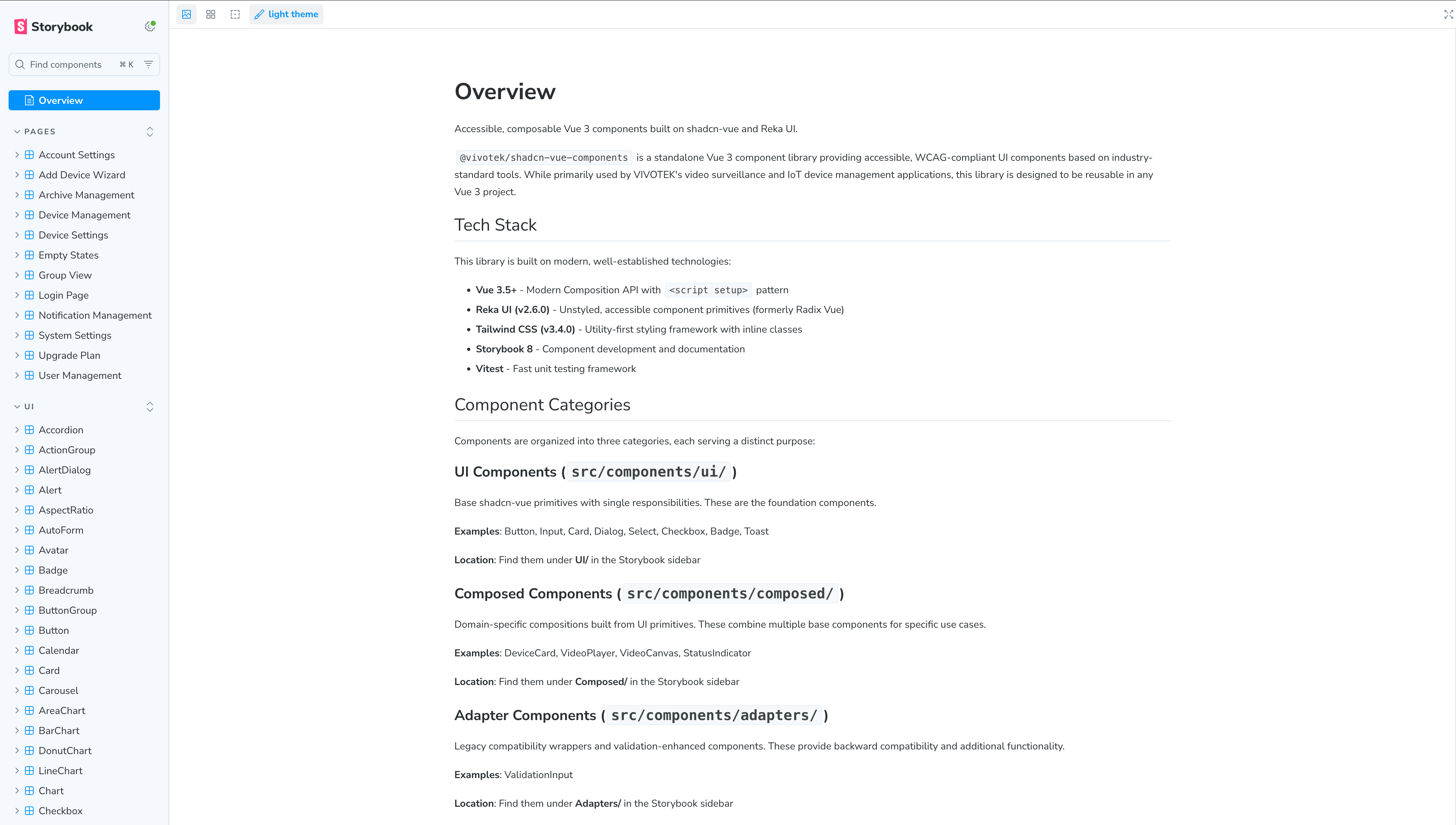
POC Status
This is a proof-of-concept implementation. Additional resources are required for further research and development before production adoption.
Monorepo Architecture
Registry Pattern for Multiple Applications
packages/
├── design-tokens/           # @vivotek/design-tokens
│   ├── tokens/              # DTCG-compliant token files
│   └── dist/                # Generated CSS, JS, Tailwind preset
│
├── ui/                      # @vivotek/ui (shadcn-based)
│   ├── registry.json        # Component registry definition
│   ├── components/
│   │   ├── ui/              # Base shadcn components
│   │   └── domain/          # Domain-specific components
│   └── package.json
│
└── apps/
    ├── vsaas-portal/        # Uses @vivotek/ui
    ├── admin-dashboard/     # Uses @vivotek/ui
    └── mobile-pwa/          # Uses @vivotek/ui
Benefits
| Aspect | Traditional Library | shadcn/ui + Registry |
|---|---|---|
| Customization | Override CSS | Modify source |
| Updates | Breaking changes | Selective updates |
| AI Understanding | Black box | Full visibility |
| Cross-project sharing | npm publish | Private registry |
| Domain components | Wrapper components | First-class citizens |
Implementation Roadmap
Phase 1: Foundation Setup (Week 1-2)
Goal: Establish shadcn/ui base in one pilot project.
# Initialize shadcn/ui
npx shadcn@latest init

# Configure with design tokens
# Update tailwind.config.js to use @vivotek/design-tokens preset
Deliverables:
- [ ] shadcn/ui initialized in pilot project
- [ ] Design tokens integration verified
- [ ] 5 core components copied: Button, Input, Card, Dialog, Badge
Phase 2: Domain Extensions (Week 3-4)
Goal: Create domain-specific components using design tokens.
Deliverables:
- [ ] DeviceCard component with status colors
- [ ] DeviceList with virtual scrolling
- [ ] StatusBadge using domain semantic colors
- [ ] Update CLAUDE.md with component guidelines
Phase 3: Registry Creation (Week 5-6)
Goal: Establish private component registry for cross-project sharing.
Deliverables:
- [ ] Create @vivotek/ui package
- [ ] Define registry.json with all domain components
- [ ] Document registry installation process
- [ ] Test cross-project component installation
Phase 4: AI Integration (Week 7-8)
Goal: Optimize for AI-assisted development.
Deliverables:
- [ ] Add AI hints to all component documentation
- [ ] Configure MCP for shadcn registry access
- [ ] Test AI component generation accuracy
- [ ] Create component discovery prompts
CLAUDE.md Integration
## UI Components (shadcn/ui)

### Component Location
- **Base components**: `src/components/ui/` (shadcn/ui copies)
- **Domain components**: `src/components/domain/`
- **Design tokens**: `@vivotek/design-tokens`

### Component Usage
- **Always check** existing components before creating new ones
- **Use Tailwind classes** with design token values
- **Follow shadcn patterns** for variants and composition

### AI Guidelines
When asked to create UI:
1. First search `src/components/ui/` and `src/components/domain/`
2. Use existing shadcn variants where possible
3. Extend with domain semantic colors from design tokens
4. Never use raw color values - always use token classes

### Prohibited
- Creating components that duplicate shadcn base functionality
- Using colors outside design token system
- Importing from `@radix-ui` directly (use shadcn wrappers)
- Adding dependencies without checking if shadcn alternative exists
Success Metrics
| Metric | Before | Target | How to Measure |
|---|---|---|---|
| CSS override lines | High | Near zero | Count !important usage |
| AI component accuracy | ~40% | >85% | Track AI-generated PRs |
| Component discovery time | Minutes | Seconds | Developer survey |
| Cross-project consistency | Low | High | Visual audit |
| Upgrade impact | Breaking | Minimal | Track version migrations |
References
- shadcn/ui Documentation
- Claude Web Artifacts Builder Skill - Official Anthropic skill using React + Tailwind CSS + shadcn/ui as the standard stack for generating frontend artifacts
- JSDC 2025: Monorepo UI Library Selection
- Design Tokens W3C DTCG Specification
- Model Context Protocol (MCP)
Related: Design System Proposal | Back: Proposals Overview