以 shadcn/ui 作為設計系統基礎
本提案建議採用 shadcn/ui 作為真正設計系統架構的實作基礎。這種方式解決了傳統元件庫的核心問題,同時最大化 AI 程式碼生成的效能。
核心洞察: shadcn/ui 的「複製並擁有」模式將 UI 開發從依賴消費轉變為基礎建設擁有權,讓人類和 AI 開發者都能使用完全可存取、可修改的程式碼。
為何不使用傳統元件庫?
Ant Design、Material UI 等的問題
傳統元件庫對人類開發者和 AI 代理都帶來重大挑戰:
| 挑戰 | 對人類的影響 | 對 AI 的影響 |
|---|---|---|
| 深層依賴 | 版本衝突、打包體積 | 無法看到內部實作 |
| 客製化受限 | 需要大量 CSS 覆蓋 | 生成非標準客製化 |
| 升級風險 | 大版本破壞樣式 | 學到過時的模式 |
| 框架鎖定 | 難以遷移 | 對框架特定 API 困惑 |
實際範例:Ant Design 客製化
vue
<!-- 傳統方式:與元件庫對抗 -->
<template>
  <a-button
    class="custom-button"
    :style="{
      '--ant-primary-color': '#006bd6',
      '--ant-primary-color-hover': '#3d8fe8'
    }"
  >
    提交
  </a-button>
</template>

<style>
/* 覆蓋層疊噩夢 */
.custom-button.ant-btn-primary {
  background-color: var(--ant-primary-color) !important;
  border-color: var(--ant-primary-color) !important;
}
.custom-button.ant-btn-primary:hover {
  background-color: var(--ant-primary-color-hover) !important;
}
/* 更多 focus、active、disabled 狀態的覆蓋... */
</style>
shadcn/ui 方式:Hard Fork 彈性
核心理念
shadcn/ui 採用根本不同的方式:
「複製程式碼到你的專案。擁有它。自由修改。」
直接複製元件程式碼到專案中,擁有完全的修改自由。
核心優勢
1. 擁有權與控制
你維持完全的程式碼擁有權,不需等待上游發布:
typescript
// 你的專案:components/ui/button.tsx
// 完全控制 - 任意修改

export const Button = forwardRef<HTMLButtonElement, ButtonProps>(
  ({ variant = "default", size = "default", ...props }, ref) => {
    // 加入領域特定邏輯
    const { trackAnalytics } = useAnalytics()

    return (
      <button
        ref={ref}
        className={cn(buttonVariants({ variant, size }))}
        onClick={(e) => {
          trackAnalytics('button_click', { variant })
          props.onClick?.(e)
        }}
        {...props}
      />
    )
  }
)
2. AI 可存取的實作
由於程式碼在你的專案中,AI 可以:
- 讀取和理解元件實作
- 根據實際程式碼建議修改
- 依照現有模式生成新元件
- 永遠不會被隱藏的程式庫內部困惑
markdown
## CLAUDE.md 條目

### UI 元件
- **位置**:`src/components/ui/`
- **模式**:shadcn/ui 元件加上領域客製化
- **樣式**:使用 `@vivotek/design-tokens` 的 Tailwind CSS

建立 UI 時:
1. 檢查 `src/components/ui/` 是否有現有元件
2. 使用 shadcn/ui 的變體和尺寸
3. 遵循現有 button、input、card 模式
3. 自訂 Registry 建立
除了基礎元件,shadcn/ui 支援私有元件 Registry:
json
// registry.json - 公司內部元件
{
  "name": "vivotek-ui",
  "dependencies": {
    "@vivotek/design-tokens": "^1.0.0"
  },
  "registryDependencies": ["button", "card"],
  "files": [
    {
      "name": "device-card.tsx",
      "content": "..."
    }
  ]
}
這支援:
- 跨專案元件共享
- 公司內部元件庫
- 私有 GitHub repository 分發
- 企業用 Token 驗證
4. 透過 MCP 實現 AI 驅動開發
shadcn/ui 現在支援 Model Context Protocol (MCP),實現:
使用者:「在卡片上加入裝置狀態指示器」

AI(使用 MCP):
1. 查詢 shadcn registry 的 badge、indicator 元件
2. 讀取現有 DeviceCard 實作
3. 使用設計 tokens 生成修改
4. 輸出符合專案慣例的程式碼
與設計 Tokens 整合
連接 shadcn/ui 與 @vivotek/design-tokens
@vivotek/design-tokens 套件提供基礎:
javascript
// tailwind.config.js
import vivotekPreset from '@vivotek/design-tokens/tailwind';

export default {
  presets: [vivotekPreset],
  content: ['./src/**/*.{vue,ts,tsx}'],
};
基於 Token 的元件樣式
typescript
// components/ui/button.tsx
const buttonVariants = cva(
  "inline-flex items-center justify-center rounded-md font-medium transition-base",
  {
    variants: {
      variant: {
        default: "bg-primary text-primary-foreground hover:bg-primary/90",
        destructive: "bg-destructive text-destructive-foreground hover:bg-destructive/90",
        outline: "border border-input bg-background hover:bg-accent",
        secondary: "bg-secondary text-secondary-foreground hover:bg-secondary/80",
        ghost: "hover:bg-accent hover:text-accent-foreground",
        link: "text-primary underline-offset-4 hover:underline",
      },
      size: {
        default: "h-10 px-4 py-2",
        sm: "h-9 rounded-md px-3",
        lg: "h-11 rounded-md px-8",
        icon: "h-10 w-10",
      },
    },
    defaultVariants: {
      variant: "default",
      size: "default",
    },
  }
)
領域特定擴展
typescript
// components/domain/device-status-badge.tsx
import { Badge } from "@/components/ui/badge"

// 使用設計 tokens 的領域顏色擴展
const statusVariants = {
  online: "bg-status-online text-status-online-foreground",
  offline: "bg-status-offline text-status-offline-foreground",
  recording: "bg-status-recording text-status-recording-foreground",
  error: "bg-status-error text-status-error-foreground",
}

export function DeviceStatusBadge({ status }: { status: DeviceStatus }) {
  return (
    <Badge className={statusVariants[status]}>
      {status}
    </Badge>
  )
}
參考實作
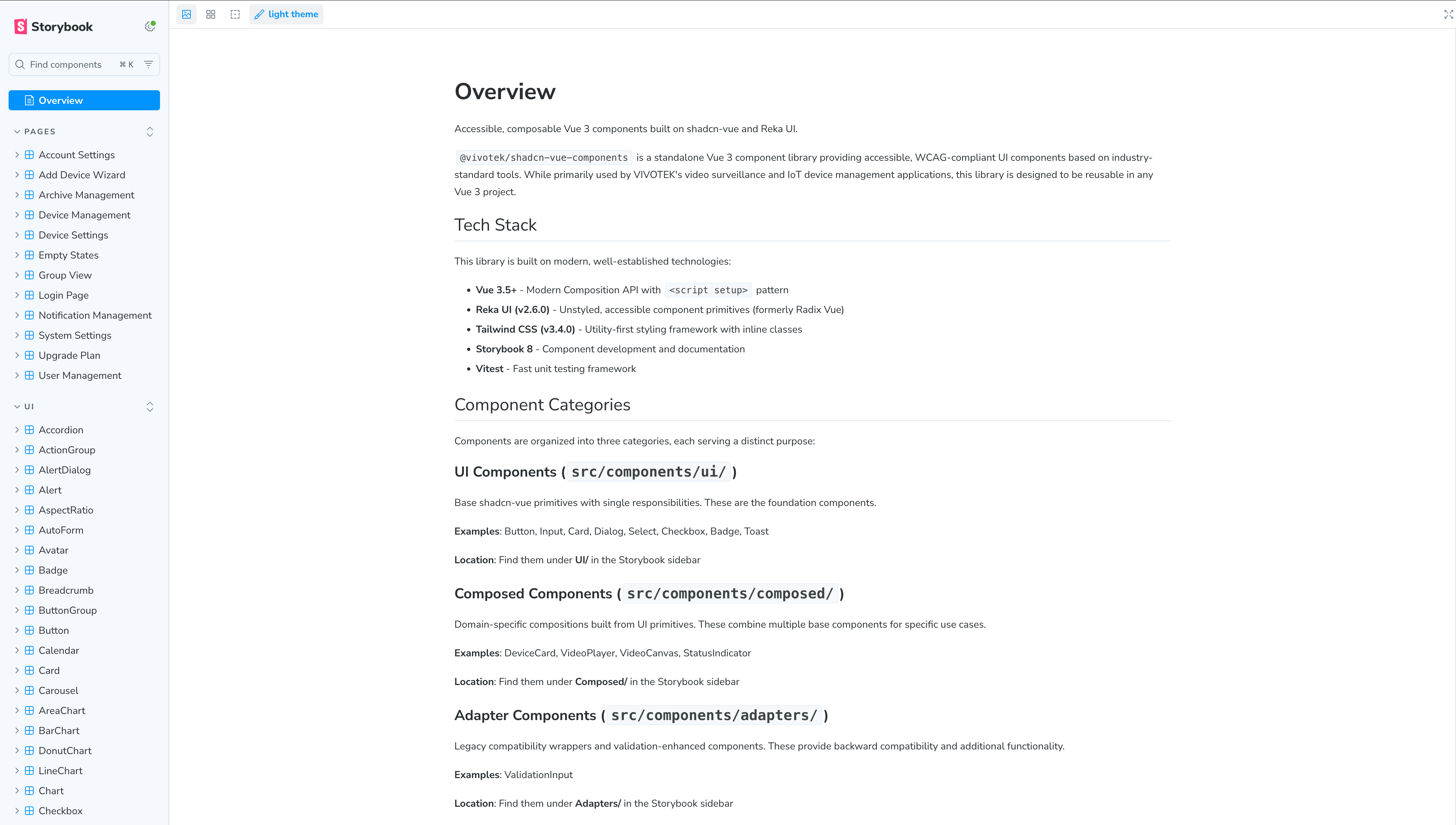
POC 狀態
此為概念驗證實作,正式採用前需另外投入資源進行調研或開發。
Monorepo 架構
多應用程式的 Registry 模式
packages/
├── design-tokens/           # @vivotek/design-tokens
│   ├── tokens/              # DTCG 規範 token 檔案
│   └── dist/                # 生成的 CSS、JS、Tailwind preset
│
├── ui/                      # @vivotek/ui(基於 shadcn)
│   ├── registry.json        # 元件 registry 定義
│   ├── components/
│   │   ├── ui/              # 基礎 shadcn 元件
│   │   └── domain/          # 領域特定元件
│   └── package.json
│
└── apps/
    ├── vsaas-portal/        # 使用 @vivotek/ui
    ├── admin-dashboard/     # 使用 @vivotek/ui
    └── mobile-pwa/          # 使用 @vivotek/ui
效益比較
| 面向 | 傳統元件庫 | shadcn/ui + Registry |
|---|---|---|
| 客製化 | 覆蓋 CSS | 修改原始碼 |
| 更新 | 破壞性變更 | 選擇性更新 |
| AI 理解度 | 黑箱 | 完全可見 |
| 跨專案共享 | npm 發布 | 私有 registry |
| 領域元件 | 包裝元件 | 一等公民 |
實施路線圖
階段 1:基礎建設(第 1-2 週)
目標: 在試點專案建立 shadcn/ui 基礎。
bash
# 初始化 shadcn/ui
npx shadcn@latest init

# 設定設計 tokens
# 更新 tailwind.config.js 使用 @vivotek/design-tokens preset
交付物:
- [ ] 在試點專案初始化 shadcn/ui
- [ ] 驗證設計 tokens 整合
- [ ] 複製 5 個核心元件:Button、Input、Card、Dialog、Badge
階段 2:領域擴展(第 3-4 週)
目標: 使用設計 tokens 建立領域特定元件。
交付物:
- [ ] 帶狀態顏色的 DeviceCard 元件
- [ ] 虛擬捲動的 DeviceList
- [ ] 使用領域語意顏色的 StatusBadge
- [ ] 更新 CLAUDE.md 元件指引
階段 3:Registry 建立(第 5-6 週)
目標: 建立私有元件 registry 供跨專案共享。
交付物:
- [ ] 建立 @vivotek/ui 套件
- [ ] 定義包含所有領域元件的 registry.json
- [ ] 文件化 registry 安裝流程
- [ ] 測試跨專案元件安裝
階段 4:AI 整合(第 7-8 週)
目標: 針對 AI 輔助開發優化。
交付物:
- [ ] 為所有元件文件加入 AI 提示
- [ ] 設定 MCP 存取 shadcn registry
- [ ] 測試 AI 元件生成準確度
- [ ] 建立元件發現提示詞
CLAUDE.md 整合
markdown
## UI 元件(shadcn/ui)

### 元件位置
- **基礎元件**:`src/components/ui/`(shadcn/ui 複製)
- **領域元件**:`src/components/domain/`
- **設計 tokens**:`@vivotek/design-tokens`

### 元件使用
- **務必檢查**現有元件再建立新的
- **使用 Tailwind 類別**搭配設計 token 值
- **遵循 shadcn 模式**處理變體和組合

### AI 指引
被要求建立 UI 時:
1. 先搜尋 `src/components/ui/` 和 `src/components/domain/`
2. 盡可能使用現有 shadcn 變體
3. 用設計 tokens 的領域語意顏色擴展
4. 永遠不要使用原始顏色值 - 總是使用 token 類別

### 禁止事項
- 建立重複 shadcn 基礎功能的元件
- 使用設計 token 系統外的顏色
- 直接從 `@radix-ui` 匯入(使用 shadcn 包裝)
- 新增依賴前不檢查是否有 shadcn 替代方案
成功指標
| 指標 | 之前 | 目標 | 如何測量 |
|---|---|---|---|
| CSS 覆蓋行數 | 高 | 接近零 | 計算 !important 使用 |
| AI 元件準確度 | ~40% | >85% | 追蹤 AI 生成的 PR |
| 元件發現時間 | 分鐘 | 秒 | 開發者調查 |
| 跨專案一致性 | 低 | 高 | 視覺審計 |
| 升級影響 | 破壞性 | 最小化 | 追蹤版本遷移 |
參考資料
- shadcn/ui 文件
- Claude Web Artifacts Builder Skill - Anthropic 官方 skill,使用 React + Tailwind CSS + shadcn/ui 作為生成前端產出的標準技術堆疊
- JSDC 2025:Monorepo UI Library 選擇
- Design Tokens W3C DTCG 規範
- Model Context Protocol (MCP)